本站已升级 Typecho 1.3.0 正式稳定版
暂时没有发现什么明显的改变。
下载地址:https://typecho.org/download
升级指南:https://docs.typecho.org/upgrade
暂时没有发现什么明显的改变。
下载地址:https://typecho.org/download
升级指南:https://docs.typecho.org/upgrade
旧板子能正常工作,新板子是空的,这时怎么把程序迁移过去?本文记录一次“对拷”流程:通过读取旧板 Flash 中的配置数据,导出 .jic 文件,再写入到新板 Flash,实现新板上电即运行。
对很多 Cyclone 系列来说,现场“下载 FPGA 程序”本质是把配置数据写进板上的配置 Flash。因此只要能把旧板 Flash 的内容读出来,就能写进新板 Flash,达到复制效果。这次的测试板的硬件为 Cyclone III EP3C16Q240 + EPCS16 Flash
在开始读写 Flash 前,务必确认新旧板硬件状态完全一致,尤其是相关的短接点或 0Ω 电阻等。
流程基于 Quartus 的 Programmer,先把所有 Quartus 关掉,再打开 Quartus ➜ Tools ➜ Programmer(我用的是 Quartus 13.1)。确保下载器(如 USB-Blaster)在 Programmer 中可正常识别与通信。
.jic 条目,点击 Save File 保存到电脑*.jic 加载进来nios2-ide.exe Nios II EDS 9.1(Embedded Design Suite) Nios II Integrated Development Environment Version: 9.1 Build: 222 Quartus
现在,Altera 一些旧版本的软件下载是 ftp 链接,现在都已经失效了。
例如 quartus ii 9.1 下载地址:ftp://ftp.altera.com/outgoing/release/91_quartus_windows.exe 2.77GB ftp://ftp.altera.com/outgoing/release/91_nios2eds_windows.exe 576MB ftp://ftp.altera.com/outgoing/release/91_modelsim_ae_windows.exe 586MB ftp://ftp.altera.com/outgoing/release/91_dsp_builder_windows.exe 87MB
可以尝试 Intel 的域名,可能能直接命中旧文件。wget -c -O 91_nios2eds_windows.exe https://fpgadownload.intel.com/outgoing/release/91_nios2eds_windows.exe
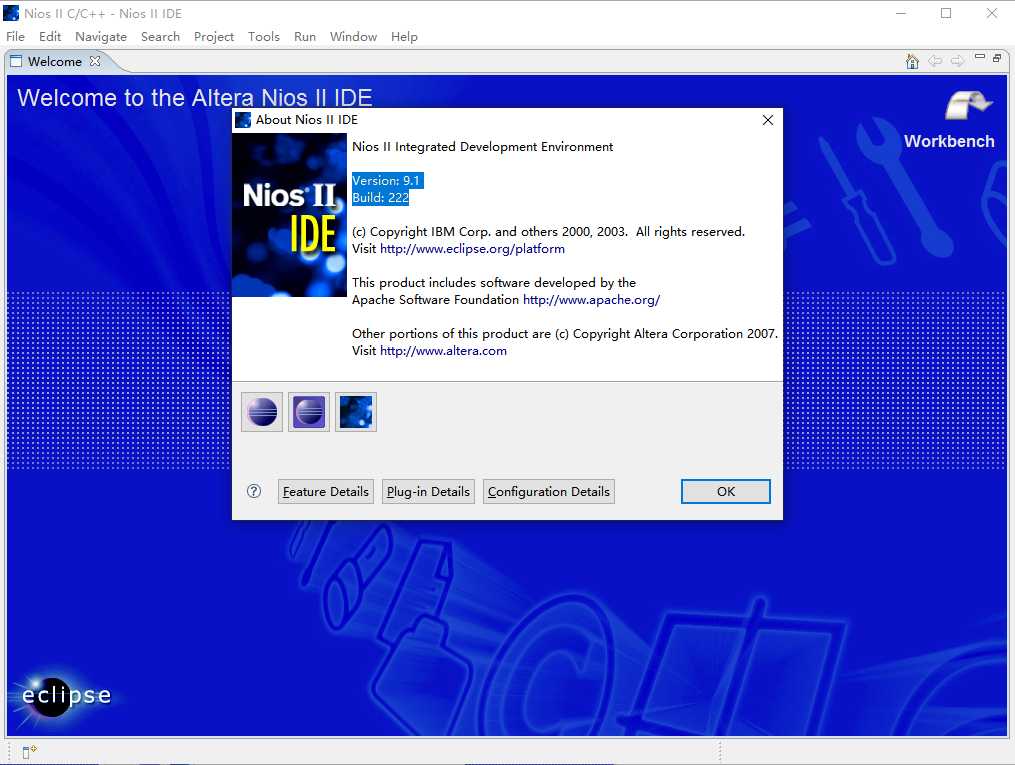
其他文件的下载也可以参考这个逻辑。
Armbian 是一款基于 Debian 或 Ubuntu 的开源操作系统,专门针对嵌入式 ARM 平台进行优化和定制。
在 Github 上,amlogic-s9xxx-armbian 是一个 Armbian 的开源库,这个作者的固件还是比较好用的。其中, trixie 是基于最新 Debian 13 构建的,Docker 可以正常安装和使用,16GB EMMC 存储也都正常地完整扩容了,非常给力。立创·泰山派可以检索代号为lckfb的固件,可以“养老”了。
开源作者:https://github.com/ophub
开源库:https://github.com/ophub/amlogic-s9xxx-armbian
检索代号为lckfb的固件:Github 链接
发现一个 LOADER 设备后松开 Recovery 键。右键添加项。0x00000000, 名字 system, 路径选择要刷的 *.img 系统。登录路由器后台,查看分配的 IP 地址,设备名为debian,类似于192.168.0.50。
电脑连接同一个路由器,浏览器访问IP:5666,类似于192.168.0.50:5666。
开始进去提示可以更新内核,但是点了好像没反应。另外,可能是因为我没有内测资格,应用商店是空的。Docker 管理可以用,可以正常注册 FN Connect。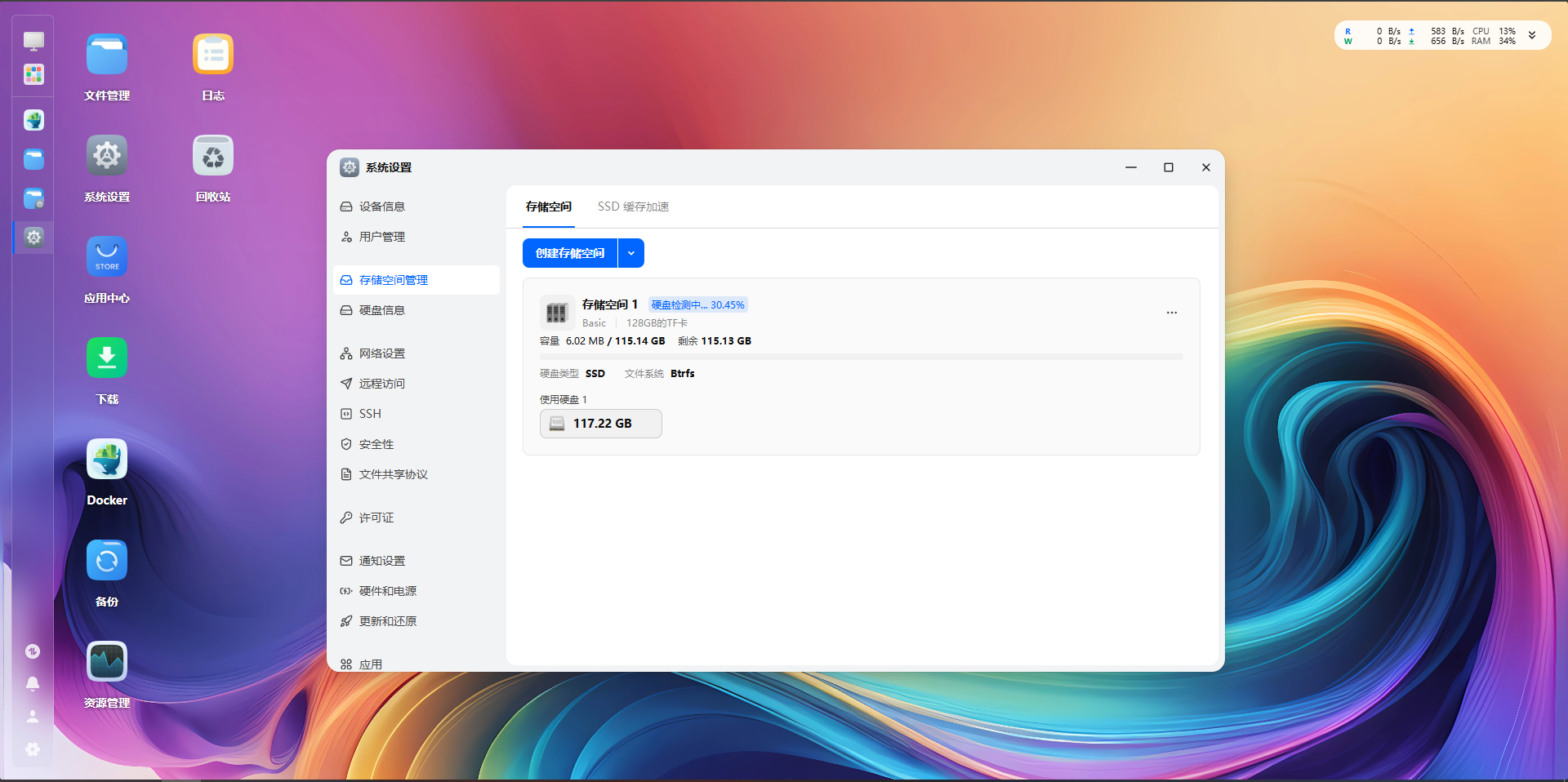
为了正常用上 1Panel 的 OpenResty,可以在:设置 - 安全性 - 端口设置 - 访问端口 - 关闭重定向 80 和 443 端口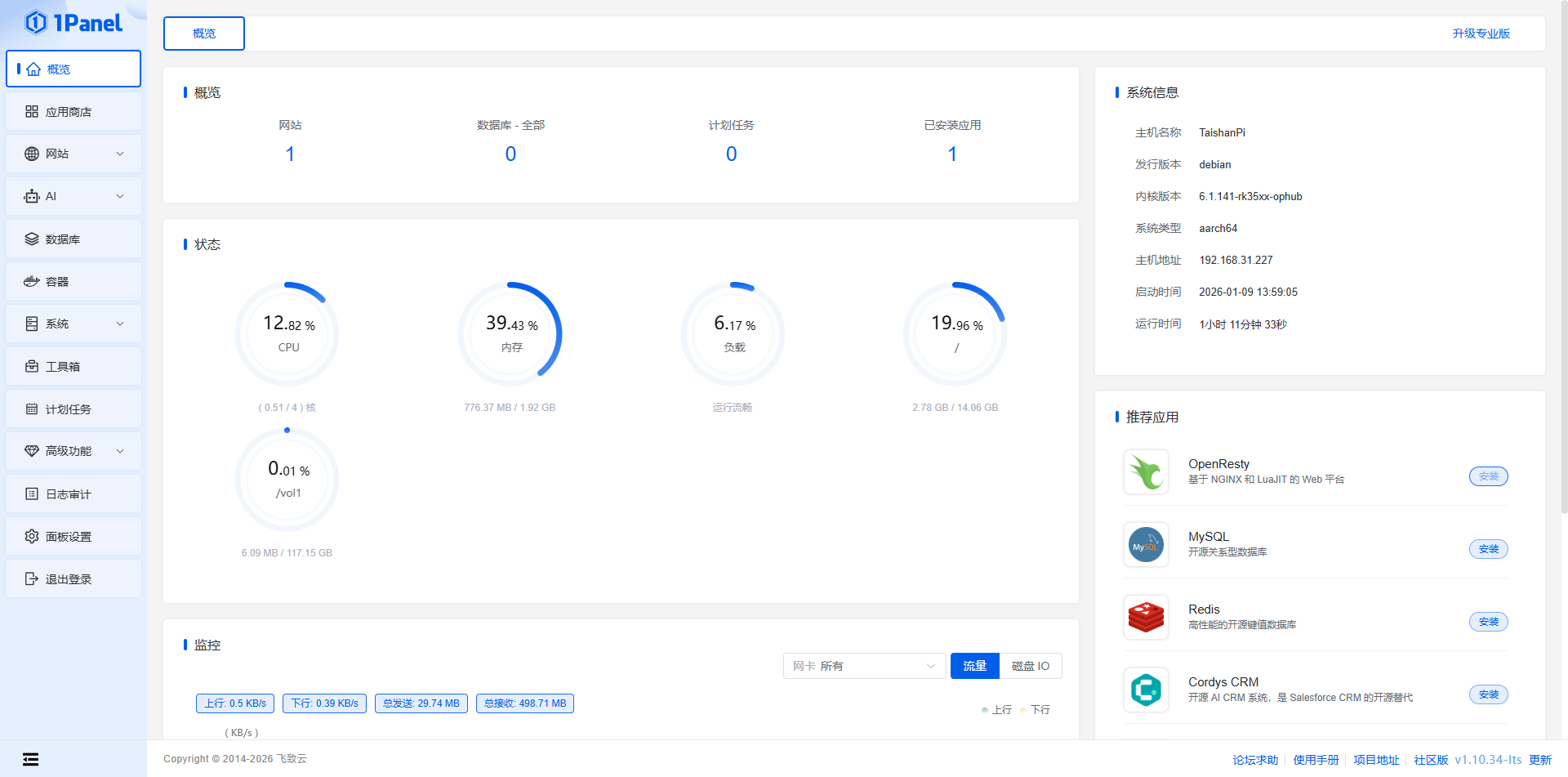
新建提示权限不足的话,可以直接 SSH 给用户对应的权限。MP4 文件能上传,不能查看、下载。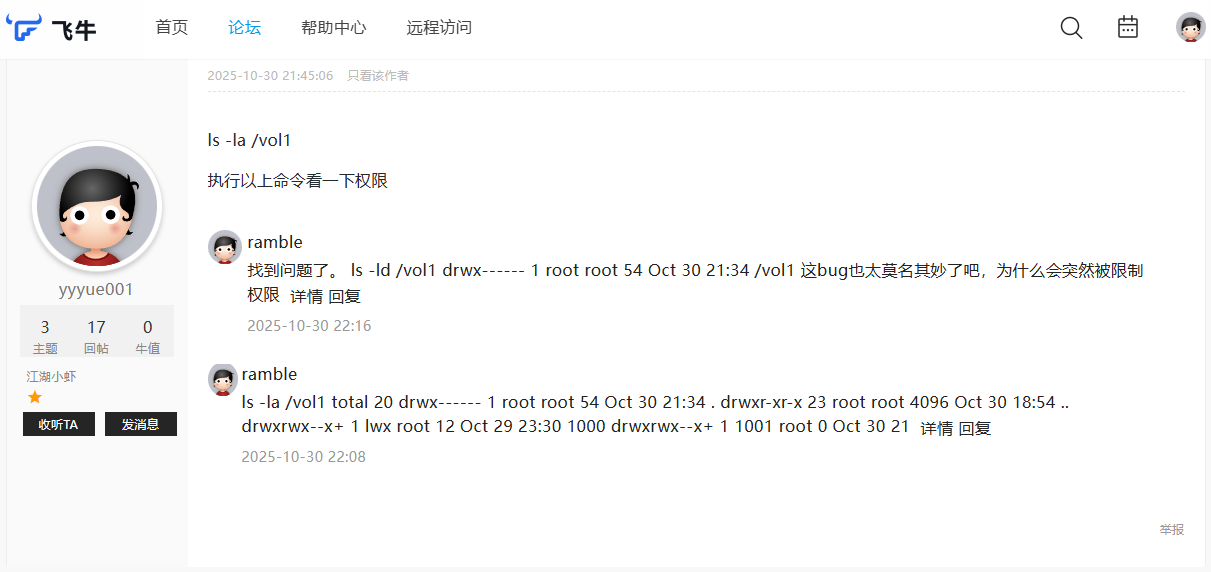
点击展开示例:博客格式化提示词
帮我格式化Markdown文本
1. 英文与中文之间加空格
2. 标点符号前的空格
3. 专有名词修正
4. 大体保持原有格式
5. URL、代码块、配置文件保持原状
6. 连续英文词汇保持紧凑(如SYSTEMD-JOURNAL)
7. 路径和变量名保持紧凑(如/opt/monitor)
<details>
<summary>点击展开提示</summary>
示例:这里可以写 **Markdown 内容**
</details><div style="padding: 15px; background-color: #e7f3f0; color: #1e4620; border-left: 5px solid #4caf50; border-radius: 4px; margin-bottom: 10px;">
✅ <b>成功:</b> 这是一个绿色的成功提示框。
</div>| 日期 | 进度 |
|---|---|
| 2025.10.22 | Received at Editorial Office |
| 2025.12.23 | Article revised |
| 2026.01.06 | Article accepted for publication |
| 2026.01.09 | Offprint order letter sent to you for completion |
| 2026.01.09 | Rights & Access form sent to you for completion |
| 2026.01.09 | Article published online |
| 2026.01.09 | Proofs available for checking |
| 2026.01.10 | Rights & Access form completed by you |
| 2026.01.10 | Your proof corrections have been returned to Elsevier |
| 2026.01.14 | The Share Link has been sent to you |
| 2026.01.14 | Final version of your article published online |
Title
A novel broken wire localization method for bridge cables based on multi-component magnetic flux leakage testing
Keywords
Bridge cables; Multi-component MFL signals; Broken wire; Magnetic dipole model; Defect localization
DOI Link
https://doi.org/10.1016/j.jmmm.2026.173817

最近遇到个很迷惑的问题,同一个静态前端网页在其他手机、电脑显示正常,但在我这台 Win10 机器上,彩虹流动的 CSS 动画完全不动,颜色渲染也有点怪,换了 3 个浏览器,结果都一样。
在 AI 的帮助下,浏览器下按F12,并打开控制台,执行matchMedia('(prefers-reduced-motion: reduce)').matches,结果返回true。这意味着系统开启了“减少动态效果”,浏览器检测到后,会主动把动画禁用。
设置 → 轻松使用 → 显示 → 打开在 Windows 中显示动画
控制面板 → 轻松使用 → 轻松使用中心 → 使计算机更易于查看 → 取消勾选关闭所有不必要的动画
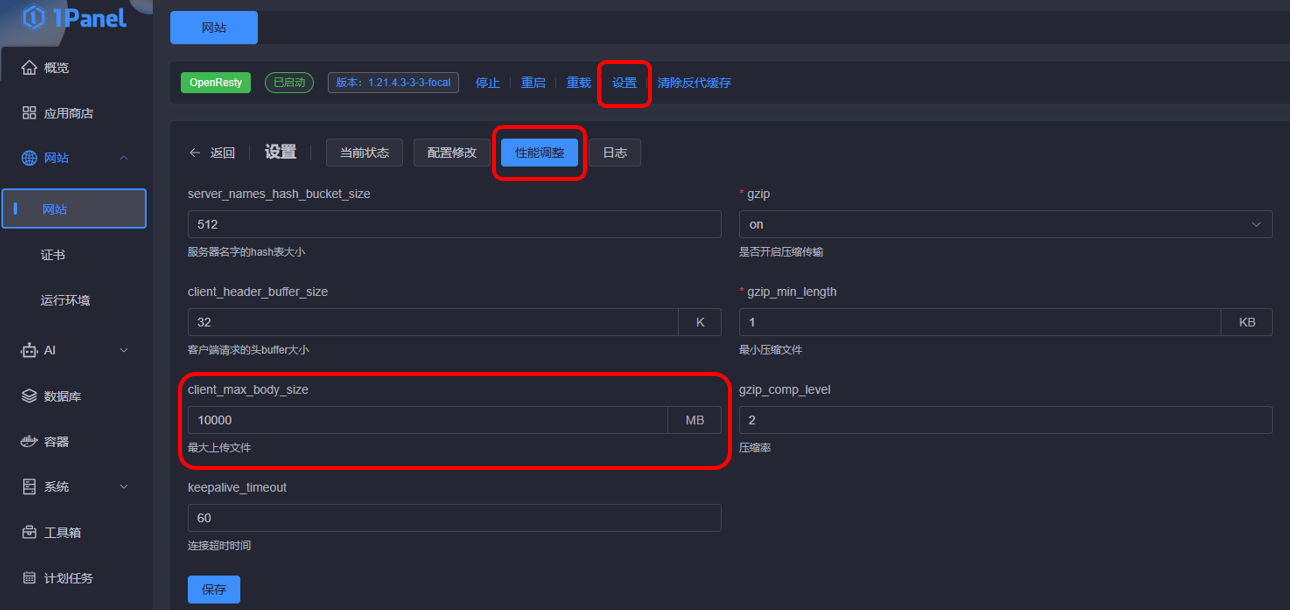
针对上传文件出现OpenList上传文件时提示:Request failed with status code 413的报错,文档中的说法是Nginx配置的文件大小所限制,修改Nginx的client_max_body_size就可以。
我这里使用的是1Panel,默认安装的是OpenResty。其设置位置在:网站-网站-设置-性能调整-client_max_body_size。修改完成之后,需重启OpenResty。现在还是有问题,待解决。
👉 更新:Cloudflare 对经过小橙云代理的请求体大小有限制,Free 套餐为 100 MB,超过就会直接 413,所以关闭小橙云即可。
网上搜索关键词:映射网络驱动器、WebDAV等。另外,别忘了给对应用户授予权限,详见教程:https://doc.oplist.org/guide/advanced/webdav
👉 需要修改注册表,网上搜索有详细教程,总结如下:
reg delete "HKLM\SOFTWARE\Microsoft\Windows\CurrentVersion\Policies\Explorer" /v NoNetConnectDisconnect /f
reg delete "HKCU\SOFTWARE\Microsoft\Windows\CurrentVersion\Policies\Explorer" /v NoNetConnectDisconnect /fhttps://github.com/Termix-SSH/Termix
https://github.com/users/lukegus/packages/container/package/termix
docker pull ghcr.io/lukegus/termix:dev-1.10.0
添加 CNAME,将 子域名 解析到 www.shopify.com,关闭小橙云,完成优选域名的添加。
其他 Cloudflare 优选域名请自行搜索,如 www.visa.com。
打开一个项目,进入 设置 - 域和路由 - 添加 - 路由,填上形如 子域名.example.com/*
从测速网站上可见,已经成功加速了 Workers 项目的访问速度。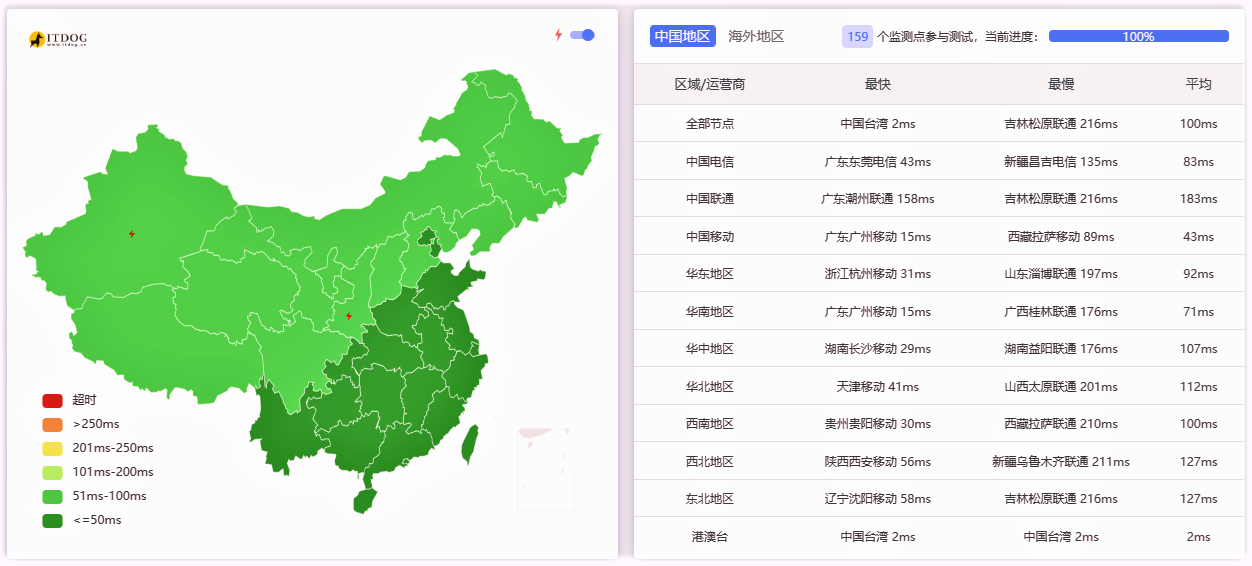

 |  |  |
 |  |  |
从Clooudflare 2025年度报告说起,2025年也是过得好快啊,开始“坐班式”地进行工作,感觉是“匆匆忙忙”的一年。
现在突然去回想的话,最初的记忆应该来自于 3 月份,刚开始去柳州出差了 8 天,吃了几次螺蛳粉。然后就是每个月平均都会出差一次,去了不少地方。在德阳,上了高铁的铁路桥,算是比较印象深刻的,为了赶高铁空窗期,熬了个通宵。在成都、北京、哈尔滨还见了几位老朋友。在北京是跟着无穷小亮的视频逛的,有些没去过的地方也逛了一下,但是越来越不喜欢特种兵式徒步,有点累。
上半年时候,从 5 月份开始,参加了武汉渡江节大众组的选拔。5–7 月在东湖听涛景区参加了 8 次长距离的蛙泳训练,平均都是1500 米以上,作为小卡拉米,刚开始实在是有点霸王硬上弓了,最后成功横渡长江,算是一个不错的人生体验。有一次训练的时候下着小雨,东湖刮着风,有好大的浪,还是挺惊险的。整个过程也没认识什么朋友,倒是见识了 50、60 岁依然热爱游泳的一群人。最大的感受是:锻炼身体是一辈子的事,身体健康比什么都重要。参加完这次活动之后,现在去游泳都有点佛系了,主要还是以活动身体为主,再也不想搞那么极限了,怕自己失去兴趣。
今年 10 月份,乃至更早一点,开始接触 AI 编程和 Linux 方面的知识。最开始是 Github 的学生优惠里的 Copilot,以它为主要工具,写了项目的 FPGA 程序。后面了解了 Claude 和 Codex,不过暂时已经需求不大了,主要搞一些简单的 HTML。再后面,购买了域名。时至今日,在 AI 的帮助下,搭建了一些小网站,还了解了一些新的软件知识,还是挺有意思的。包括去年买的泰山派,一直吃灰,今年也玩上了。今年 AI 进步也是很大,国产的也有很多不错的模型,比如 MiniMax-M2。后面想去了解下 Docker 之类的吧,还想系统地了解一下搭建网站的工具。
想到什么再补充吧,最近有点困顿。

大概是几十天前,我在查询 whois 时发现, SixHz.com 的前任主人已经不再续费了,但域名还没开放购买。于是把相关信息发给 AI,问了下大致的释放时间。从那之后,就会偶尔搜一下,看看能不能买到。
这个世界上,有些事情可遇不可求,而这一次我很幸运,今天终于蹲到了。
域名是在 Cloudflare 购买的,价格是 10.46 美元 / 年。
顺手查了下历史,这个域名之前被用作 Go 组件托管地址 sixhz.com/szamlazzhu,似乎和匈牙利的发票业务有关,还挺有意思的。
关键词:MIUI13;小米手机;红米手机;广电流量卡;广电卡;广电流量
最近办了张广电流量卡插入 MIUI13 中,可以打电话,但是开启数据流量没有网。
解决办法:设置中搜索 APN,点击 cbnet,下滑找到 MNC 改为 15,其他不动,退出并保存。
想到一个问题:如果有一天我不再更新博客,甚至不再使用原本的服务器,这些博客内容会怎样?经过实测,如果网站不能访问,搜索引擎会在短时间内检测到并“下架”。而我想让它们继续被看见,让它们独立于服务器依赖而存在。
于是就有了这个小项目:一个用 Python + wget 做的极简博客镜像工具,可以把你的 Typecho(或其他兼容的博客)抓成一套完整的、可直接部署的静态网站。
典型用法:把 Typecho 网站静态页面部分爬虫,其他网站自行测试。
./site/,可以直接推送到 Cloudflare Pages / GitHub Pages。img src的图片类资源也会保存并重写为本地相对链接,确保离线可用。--spider 探活;镜像在 site_tmp/ 完成后替换 site/,探活或下载失败都会保留旧的 site/ 不被清空。换句话说:你的博客在任何地方都能继续「活着」。
uv 管理项目。tools/mingw64/bin/。uv run python mirror.pyuv run python mirror.py --no-cleanuv run python mirror.py --spideruv run python mirror.py --url https://example.com/ --output-dir my_site"""
The script prefers the bundled wget on Windows (tools/mingw64/bin/wget.exe),
and uses the system wget on Linux/macOS, falling back to the bundled version
when system wget is unavailable. Output defaults to ./site and can be cleaned
before each run.
"""
from __future__ import annotations
import argparse
import hashlib
import os
import platform
import re
import shutil
import subprocess
import sys
from pathlib import Path
from typing import Iterable, List
from urllib.error import URLError
from urllib.parse import urlsplit
from urllib.request import urlopen
DEFAULT_URL = "https://blog.example.com/"
DEFAULT_OUTPUT_DIR = "site"
REJECT_REGEX = r"/(admin|login|register|action|feed)/"
def project_root() -> Path:
"""Return the directory containing this script."""
return Path(__file__).resolve().parent
def resolve_output_dir(root: Path, output_dir: str) -> Path:
"""Resolve and validate the output directory inside the project root."""
target = (root / output_dir).resolve()
try:
target.relative_to(root)
except ValueError as exc:
raise ValueError("Output directory must stay under the project root") from exc
return target
def temp_output_dir(output_dir: Path) -> Path:
"""Derive a temporary output directory alongside the final output."""
return output_dir.with_name(f"{output_dir.name}_tmp")
def bundled_wget_path(root: Path) -> Path:
"""Path to the repository-bundled wget executable."""
return root / "tools" / "mingw64" / "bin" / "wget.exe"
def find_wget(root: Path) -> Path:
"""Pick the appropriate wget executable."""
system_name = platform.system().lower()
bundled = bundled_wget_path(root)
system_wget = shutil.which("wget")
if system_name == "windows":
if bundled.exists():
return bundled
if system_wget:
return Path(system_wget)
raise FileNotFoundError(
"wget not found. Expected bundled wget at tools/mingw64/bin/wget.exe "
"or a system wget in PATH."
)
if system_wget:
return Path(system_wget)
if bundled.exists():
return bundled
raise FileNotFoundError(
"wget not found. Install wget or place it at tools/mingw64/bin/wget.exe."
)
def cleanup_directory(path: Path) -> None:
"""Remove a directory tree if it exists."""
if path.exists():
shutil.rmtree(path)
def prepare_temp_directory(temp_dir: Path, seed_from: Path | None) -> None:
"""Create a fresh temporary directory, optionally seeded from an existing tree."""
cleanup_directory(temp_dir)
temp_dir.parent.mkdir(parents=True, exist_ok=True)
if seed_from and seed_from.exists():
shutil.copytree(seed_from, temp_dir)
else:
temp_dir.mkdir(parents=True, exist_ok=True)
def replace_directory(src: Path, dst: Path) -> None:
"""Replace dst with src, keeping the previous dst until replacement succeeds."""
backup = dst.with_name(f"{dst.name}_backup")
if backup.exists():
shutil.rmtree(backup)
dst.parent.mkdir(parents=True, exist_ok=True)
dst_existed = dst.exists()
if dst_existed:
dst.rename(backup)
try:
src.rename(dst)
except OSError:
if dst_existed and backup.exists():
backup.rename(dst)
raise
if backup.exists():
shutil.rmtree(backup)
def build_wget_command(
wget_path: Path, output_dir: Path, url: str, spider: bool
) -> List[str]:
"""Construct the wget command for the mirror job."""
command: List[str] = [
str(wget_path),
"--mirror",
"--convert-links",
"--adjust-extension",
"--page-requisites",
"--no-parent",
"--restrict-file-names=windows",
f"--reject-regex={REJECT_REGEX}",
"-P",
str(output_dir),
"-nH",
]
if spider:
command.append("--spider")
command.append(url)
return command
def stream_process_output(command: Iterable[str]) -> int:
"""Run a process and stream stdout/stderr to the console."""
with subprocess.Popen(
list(command),
stdout=subprocess.PIPE,
stderr=subprocess.STDOUT,
text=True,
encoding="utf-8",
errors="replace",
) as proc:
if proc.stdout:
for line in proc.stdout:
print(line, end="")
return_code = proc.wait()
return return_code
def rewrite_links_to_local(output_dir: Path, base_url: str) -> None:
"""Post-process downloaded files to point base-domain assets to local copies."""
parsed = urlsplit(base_url)
host = parsed.netloc
if not host:
return
prefixes = {f"{scheme}://{host}" for scheme in ("http", "https")}
prefixes.add(f"//{host}")
pattern = re.compile(
r"(?P<prefix>" + "|".join(re.escape(p) for p in prefixes) + r")(?P<path>/[^\s\"'>)]+)"
)
for file_path in output_dir.rglob("*"):
if file_path.suffix.lower() not in {".html", ".htm", ".css", ".js"}:
continue
try:
original = file_path.read_text(encoding="utf-8", errors="ignore")
except OSError:
continue
changed = False
def _replace(match: re.Match[str]) -> str:
nonlocal changed
url_path = match.group("path")
local_target = (output_dir / url_path.lstrip("/")).resolve()
if local_target.exists():
relative = Path(
os.path.relpath(local_target, start=file_path.parent.resolve())
)
changed = True
return str(relative).replace("\\", "/")
return match.group(0)
rewritten = pattern.sub(_replace, original)
if changed:
try:
file_path.write_text(rewritten, encoding="utf-8")
except OSError:
pass
def _hash_filename(url: str, default_ext: str = ".bin") -> str:
parsed = urlsplit(url)
ext = Path(parsed.path).suffix or default_ext
digest = hashlib.sha1(url.encode("utf-8", "ignore")).hexdigest()
return f"{digest}{ext}"
def download_external_images(output_dir: Path, base_url: str) -> None:
"""Download external img/src assets and rewrite HTML to local relative paths."""
base_host = urlsplit(base_url).netloc
external_dir = output_dir / "external_assets"
external_dir.mkdir(parents=True, exist_ok=True)
img_pattern = re.compile(
r'(<img[^>]+src=["\'])(?P<src>https?:\/\/[^"\']+)(["\'])',
flags=re.IGNORECASE,
)
replacements: dict[str, Path] = {}
html_files = [
p for p in output_dir.rglob("*") if p.suffix.lower() in {".html", ".htm"}
]
for file_path in html_files:
try:
content = file_path.read_text(encoding="utf-8", errors="ignore")
except OSError:
continue
changed = False
def _handle_match(match: re.Match[str]) -> str:
nonlocal changed
src_url = match.group("src")
host = urlsplit(src_url).netloc
if not host or host == base_host:
return match.group(0)
if src_url not in replacements:
filename = _hash_filename(src_url, default_ext=".img")
dest_path = external_dir / filename
if not dest_path.exists():
try:
with urlopen(src_url, timeout=20) as resp, open(
dest_path, "wb"
) as out_f:
shutil.copyfileobj(resp, out_f)
except (URLError, OSError):
return match.group(0)
replacements[src_url] = dest_path
dest_path = replacements[src_url]
relative = Path(
os.path.relpath(dest_path.resolve(), start=file_path.parent.resolve())
)
changed = True
new_src = str(relative).replace("\\", "/")
return f"{match.group(1)}{new_src}{match.group(3)}"
rewritten = img_pattern.sub(_handle_match, content)
if changed:
try:
file_path.write_text(rewritten, encoding="utf-8")
except OSError:
pass
def parse_args(argv: list[str] | None = None) -> argparse.Namespace:
parser = argparse.ArgumentParser(
description="Mirror https://blog.sixhz.com/ into a local static site directory."
)
parser.add_argument(
"--url",
default=DEFAULT_URL,
help="Root URL to mirror (default: %(default)s)",
)
parser.add_argument(
"--output-dir",
default=DEFAULT_OUTPUT_DIR,
help="Directory (relative to project root) to store the mirrored site (default: %(default)s)",
)
clean_group = parser.add_mutually_exclusive_group()
clean_group.add_argument(
"--clean",
dest="clean",
action="store_true",
help="Start from a fresh temporary directory instead of seeding from the existing output (default).",
)
clean_group.add_argument(
"--no-clean",
dest="clean",
action="store_false",
help="Seed the temporary download directory from the existing output before mirroring.",
)
parser.set_defaults(clean=True)
parser.add_argument(
"--spider",
action="store_true",
help="Only run wget spider mode to test links without downloading files.",
)
return parser.parse_args(argv)
def main(argv: list[str] | None = None) -> int:
args = parse_args(argv)
root = project_root()
try:
output_dir = resolve_output_dir(root, args.output_dir)
temp_dir = temp_output_dir(output_dir)
output_dir.parent.mkdir(parents=True, exist_ok=True)
temp_dir.parent.mkdir(parents=True, exist_ok=True)
wget_path = find_wget(root)
except (FileNotFoundError, ValueError) as exc:
print(exc, file=sys.stderr)
return 1
print(f"Using wget at: {wget_path}")
print(f"Output directory: {output_dir}")
print(f"Temporary directory: {temp_dir}")
# Spider-only mode remains available for manual checks.
if args.spider:
cleanup_directory(temp_dir)
spider_command = build_wget_command(wget_path, temp_dir, args.url, spider=True)
print("Running spider command:")
print(" ".join(spider_command))
spider_code = stream_process_output(spider_command)
cleanup_directory(temp_dir)
if spider_code != 0:
print(f"Spider check failed with code {spider_code}", file=sys.stderr)
return spider_code
# Pre-flight: spider the site before attempting a mirror.
cleanup_directory(temp_dir)
spider_command = build_wget_command(wget_path, temp_dir, args.url, spider=True)
print("Running spider check before mirroring:")
print(" ".join(spider_command))
spider_code = stream_process_output(spider_command)
if spider_code != 0:
print(
"Skipping mirroring because spider check failed; keeping existing output.",
file=sys.stderr,
)
cleanup_directory(temp_dir)
return spider_code
try:
seed_source = output_dir if not args.clean else None
prepare_temp_directory(temp_dir, seed_from=seed_source)
except OSError as exc:
print(f"Failed to prepare temporary directory: {exc}", file=sys.stderr)
cleanup_directory(temp_dir)
return 1
mirror_command = build_wget_command(wget_path, temp_dir, args.url, spider=False)
print("Running mirror command:")
print(" ".join(mirror_command))
return_code = stream_process_output(mirror_command)
if return_code != 0:
print(f"wget exited with code {return_code}", file=sys.stderr)
cleanup_directory(temp_dir)
return return_code
# Post-process links to ensure assets point to local copies for offline deploy.
rewrite_links_to_local(temp_dir, args.url)
download_external_images(temp_dir, args.url)
try:
replace_directory(temp_dir, output_dir)
except OSError as exc:
print(f"Failed to replace output directory: {exc}", file=sys.stderr)
cleanup_directory(temp_dir)
return 1
return return_code
if __name__ == "__main__":
sys.exit(main())可以参考run_mirror.sh,借助Github,将本项目部署在服务器上,以实现自动任务。
#!/bin/bash
set -e

# 确保能找到 uv 等命令
export PATH="/root/.local/bin:/usr/local/sbin:/usr/local/bin:/usr/sbin:/usr/bin:/sbin:/bin"

# 1. 到仓库目录
cd "$(dirname "$0")"

# 2. 确保是最新代码(可选)
git pull --rebase || true

# 3. 运行镜像脚本
uv run python mirror.py

# 4. 把新生成的内容加入 git
git add .

# 5. 提交(如果没有变更就跳过)
if ! git diff --cached --quiet; then
  git commit -m "chore: daily mirror $(date -Iseconds)"
  git push origin master
fi本项目基于 GNU GPL v3,你可以自由地使用、分发、修改。
效果之强令人震撼,我国能把这样的东西做出来,确实是人才济济。未来会发展成什么样,真的不敢轻易想象,生怕自己的想象力已经不够用了。
不过,目前在操作体验上仍显得不够人性化,依旧依赖指令式语音操控,给人的感觉更像是一款技术过渡期的产品。希望最终我们真的能迎来属于自己的“贾维斯”。
| 作品 | 评价 |
|---|---|
| 无耻之徒 第十、十一季 | 可以 |
| 黑镜 第七季 | 可以 |
| 唐探1900 | 一般 |
| 误杀3 | 一般 |
| 电幻国度 | 还可以 |
| 爱,死亡和机器人 第四季 | 一般 |
| 疯狂的麦克斯:狂暴女神 | 还行 |
| 最后生还者 第二季 | 一般 |
| 百年孤独 第一季 | 可以 |
| 鱿鱼游戏 第三季 | 一般 |
| 哪吒之魔童闹海 | 还可以 |
| 星期三 第二季 | 没看完 |
| V世代 第二季 | 还可以 |
| 神奇4侠 初露锋芒 | 一般 |
| 食贫道 何以当归 | 必看 |
| 怪奇物语 第五季 | 神了 |
| 刺杀小说家2 | 一般 |
| 食贫道 首尔夏天 | 看完了 |
| 辐射 第二季 | 在看 |
| 西线无战事 | 真实、反战 |
| 书名 |
|---|
| 《百年孤独》 |

还好有数据库备份
